

Clay Studio's Browser shows a live page inside the workspace so you and the agent can inspect and operate the same tab. It is separate from your ordinary browser window and from the optional Chrome-extension bridge.
#Open and navigate
- Select the intended conversation.
- Open Browser from the tool palette.
- Enter a URL in the address toolbar.
- Wait for the page frame and live status.
- Use the tab strip to select the tab you intend to operate.
Back, Forward, Reload, and the address field control the selected tab. Use the new-tab action for another independent tab. Verify the address before typing into a page, particularly after the agent or another person navigates.
A development URL using localhost refers to the Clay Studio host in this Browser. The application must be running and listening on the specified port.
#Share control
By default, both you and the agent can act in the tab. The lock control offers Pause Clay control to make it exclusively yours. The agent may inspect while paused but must wait for Resume shared control before manipulating it again.
This is useful for signing in or completing a sensitive form yourself. Resume only when you want the agent to continue. Asking the agent to finish its browsing activity does not revoke its shared permission.
#Test the actual viewport
The Browser uses a fixed virtual monitor. Resizing its surrounding pane scales that display; it does not change the page's layout viewport.
Use Browser viewport in the footer to choose an actual test resolution. For a responsive check, change that control, then inspect the resulting layout. A narrow docked pane alone is not evidence of mobile behavior.
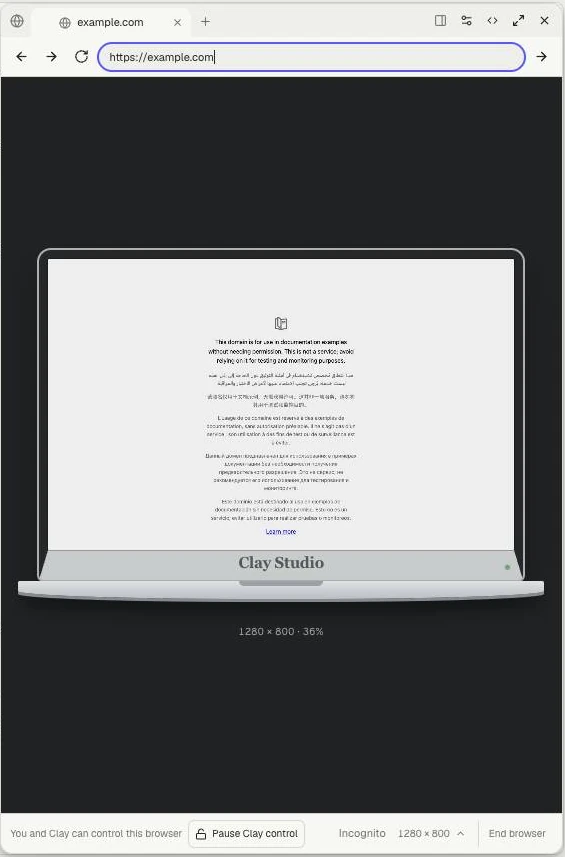
The footer separates Pause Clay control from the viewport size. The page is scaled within the pane; the displayed 1280 × 800 is its actual viewport.
#Personal and incognito data
Mate personal tabs can retain cookies and site storage for your account across Mates and browser restarts. Incognito keeps temporary isolated data. Project tabs are incognito.
Review and remove saved personal site data through Browser settings. Browser cookies do not recover provider OAuth credentials or sign the coding runtime in.
End browser ends the runtime; a retained last frame is not a live page. Closing or hiding the pane is different. Start a new browser when needed.
After an uncertain form submission, check the page before submitting again. See Workbench layout, Provider authentication, and Troubleshooting.