

Use history to recover decisions and search to locate a specific exchange. Session titles, transcript text, and repository file contents are different search targets.
#Search within a session
- Open the session you want.
- Press Command+F on macOS or Ctrl+F elsewhere to open session search.
- Type a distinctive phrase in Search in this session….
- Use Next or Enter to move forward and Previous or Shift+Enter to move backward.
- Press Escape or Close to leave search.
Clay Studio highlights matches and moves to the selected occurrence. Use a phrase such as a function name, error fragment, or decision rather than a common word. Reading the surrounding exchange matters: a proposed command and its later failed result can both match.
Scroll toward the beginning to load older conversation history. History loads in portions; the first visible screen is not necessarily the entire conversation. Wait for loading to finish when navigating an older result.
#Find another session
Use the session list's search to narrow the current project's work. The workspace command palette, opened with Command/Ctrl+K, provides navigation across its available destinations. Open the actual result and check its project and title before continuing.
Search covers conversations you can access. Clearing a search and expanding folders can reveal work hidden only by navigation filters.
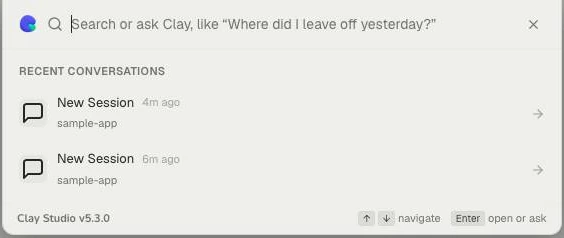
The command palette offers recent conversations before you type. Check the project beneath each title; use the search field to narrow the available destinations. These are disposable demo sessions.
#Resume from evidence
Before continuing an old task, read its latest response, pending messages, and any tool result relevant to the next action. Files may have changed outside that conversation.
A useful request is: “Find the last agreed approach in this conversation, inspect the current implementation, and tell me what remains before editing.” This avoids relying on an earlier plan as though it were current reality.
Use Project Logs for durable project outcomes and repository documents for maintained project references. In a Mate workspace, use Knowledge for reference material. Searchable transcript history is useful evidence, but it is not a substitute for those records.
If history loads but sending fails, check provider readiness and your connection. If the session is absent, verify the selected account, project access, folders, and visibility. See Session lifecycle and Troubleshooting.