

A Driver owns the user request and reviews the final result. A Split Worker receives bounded execution work while the Driver maintains the main context. This arrangement is useful when implementation can be delegated without losing the task's constraints.
#Start delegated work
Ask the project conversation to delegate a specific task. Include the intended outcome, allowed files, acceptance criteria, and checks. The ordinary desktop session also offers Add Split Worker beside the composer to open its pair controls.
Example: “Use a Split Worker to fix the validation bug. Limit changes to the parser and its existing tests. Require the relevant checks and a report of remaining uncertainty. Do not commit.”
When Clay Studio presents a proposal:
- Read the task summary and proposed steps.
- Review Why this runtime, if supplied.
- Choose the Worker provider, model, and reasoning level from available choices.
- Select Run with Split Worker.
- Watch for creation and execution status.
Choose Continue here to keep work in the current conversation instead. A proposal is not a running Worker until the actual creation/execution succeeds.
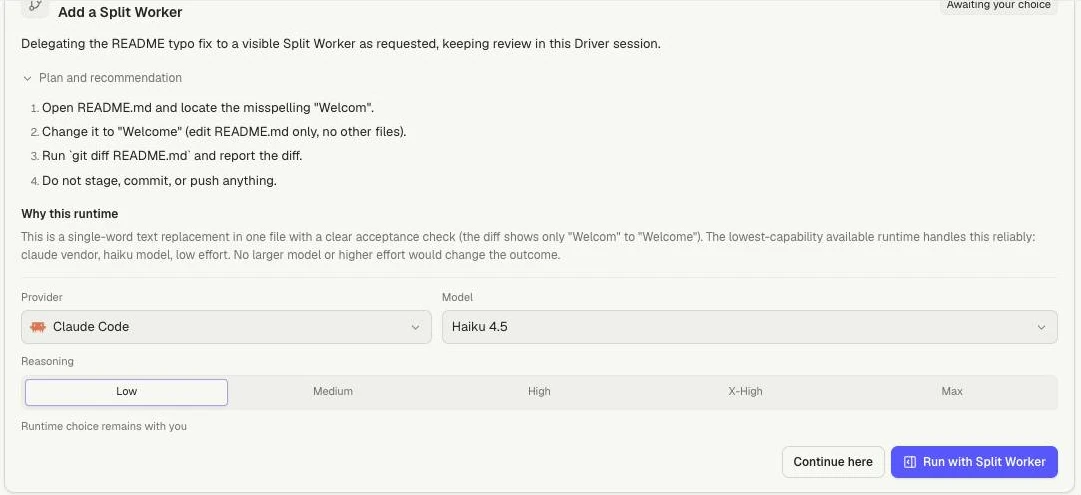
Review the scope and runtime, then choose Run with Split Worker or Continue here. The screenshot shows an awaiting-choice proposal, not completed work.
#Work with the pair
The Driver and Worker have separate conversations. Open the Worker tab or pane to inspect what it is doing. Use the Driver for task-level steering and final decisions. Send a Worker follow-up only when you intend to address that exact Worker.
Multiple Workers can belong to one Driver. Keep file scopes distinct or use worktrees where needed. A visual split does not provide filesystem isolation.
Worker messages and tool results are evidence of its activity. The Driver still needs to review the diff, checks, and acceptance criteria. A Worker saying “complete” is not independent Driver verification.
#Finish or change direction
Read the Worker report for changed files, checks that actually ran, failures, running processes, and next action. Ask the Driver to verify the result and integrate only the intended changes.
If the Worker needs replacement, review the replacement proposal and its runtime choices. Replace Split Worker and Keep current Worker are different decisions. Replacement should carry current task context, not assume the new Worker has invisible knowledge.
Use Worker lifecycle for stopping and replacement, Worker queues for delivery, and Background tasks to distinguish provider-native tasks.