

A response combines the agent's explanation with its work: tool activity, plans, questions, and progress. Start with the summary, then open the details relevant to your task.
#Review a response
- Read the outcome stated by the agent.
- Expand relevant tool activity for the action or command.
- Check actual output, failures, and exit results.
- Inspect changed files or the external destination where appropriate.
- Compare the result with your requested acceptance criteria.
For example, “I will run the tests” is a plan. A completed command with a successful exit is test evidence. A passing narrow check may still leave browser behavior unverified.
Tool cards can be collapsed to keep the transcript readable. Expand a command card to see its output or understand a failure.
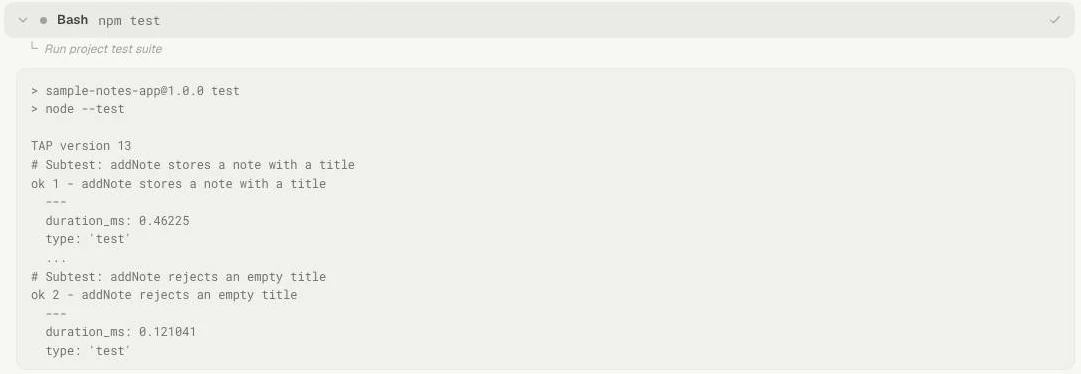
Opening the command card reveals what ran and its output. Here the sample tests check creating a note and rejecting an empty title.
#Plans and todos
Providers can expose plans or todo updates in the conversation. These help explain sequencing and progress. Availability and rendering depend on the runtime.
Read an unchecked item as remaining work. A checked item reflects the agent's reported task state; inspect the supporting result for important actions. Ask for a revised plan if the scope changes substantially.
Use Scheduled Tasks to run project work at a particular time, or Issues to track work beyond this conversation.
#Questions and reviews
A structured question asks you for missing information. Answer in the card, including a free-text clarification where needed. A permission/review card asks about a specific action and target. Read it before approving.
If work appears idle, look for an unanswered question, pending permission, rate-limit notice, or paused queue. Sending another ordinary message may only add pending work.
#Preserve useful results
Keep project reference material in repository documents, durable task outcomes in Project Logs, and reminders in Notes. A Mate can keep its reference documents in Knowledge.
For incomplete or uncertain execution, ask the agent to state what actually happened and what remains. See Stop and recovery and Usage and context.