

A debate brings several Mate perspectives to a decision. Use it when different responsibilities could reveal tradeoffs—for example, asking a reliability reviewer and a product reviewer whether a first release should support offline editing.
#Prepare the discussion
Open a Mate's full workspace and choose Debates from the tool palette. Select New debate, enter the question, and choose Continue in chat to plan it with Clay. You can also ask Clay or a suitable Mate to set up a debate in conversation.
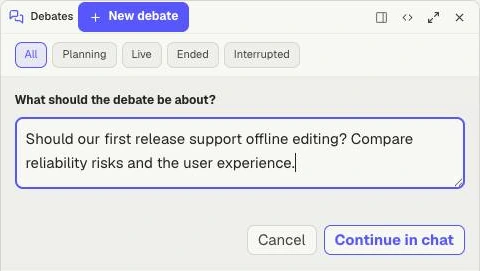
New debate starts with a question. Continue in chat takes it into planning; it does not by itself show an approved panel or a completed debate. This demo draft was cancelled.
Describe the decision, useful background, and the perspectives you want. The setup can ask about format, moderator, participants, and constraints.
When the Debate proposal appears:
- Read the topic and context.
- Check the moderator and each panelist.
- Review their roles and any model choices.
- Approve the proposal to begin.
Give panelists distinct responsibilities. “Assess operational risks” and “Assess the user experience” usually produce a more useful discussion than asking everyone for a general opinion.
#Watch and contribute
Follow the live discussion in its conversation. Raise hand requests a chance to contribute; when the input is offered, write your message and choose Send, or Pass. Stop debate requests an end after the current speaker finishes; the status tells you when stopping is pending.
If a participant cannot start, read the error before relying on the panel's coverage of that perspective.
#Use the result
Read the disagreements and unresolved questions as well as the recommendation. A debate provides analysis; it does not implement its recommendation. If the decision depends on uncertain behavior, ask for source checks or a prototype.
Keep a reusable brief in a Mate's Knowledge. When taking the decision into project work, ask the project's Driver to record the adopted decision in Logs and create Issues for actionable follow-up. Share only the private Mate context you intend to disclose.
#Return to an earlier debate
Open Debates in a Mate workspace and select the discussion. Filters include All, Planning, Live, Ended, and Interrupted. This lets you revisit an earlier conclusion without starting the same debate again.