

Project Logs are the durable account of what was requested, what happened, what was verified, and what remains. They let a new Driver continue useful work without rereading the whole conversation.
#Read the ledger
- Select the project.
- Open Logs from the tool palette.
- Use Search logs or Filter by category.
- Open an entry.
- Read its summary, detailed record, authorship, history, and discussion.
In worktrees, the change-scope filter distinguishes Current worktree, Project, and All changes. A record absent from one scope can still exist in another. Check the filter before asking for a duplicate.
Categories are the project's own vocabulary. Priority—Normal, Important, or Urgent—is separate from category.
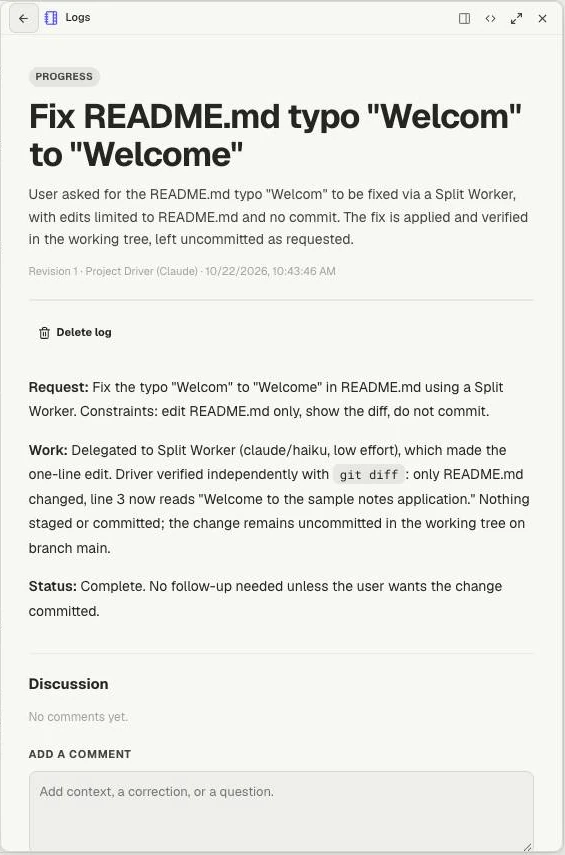
A Log keeps the request, result and verification together. This is revision 1 of a demo task; the discussion below is where a person can add a correction.
#Ask for a useful record
The Project Driver writes and revises Log entries. People can read and comment rather than silently rewriting the ledger.
For example: “Record this task's outcome in the existing Log: what changed, the checks that passed, the browser behavior still unverified, and the next action.”
One coherent task should normally have one evolving entry. As work progresses, the Driver revises it; revision history preserves earlier states. A commit history alone often lacks the user's constraints or unfinished work.
#Correct an entry
Add a comment explaining the correction and evidence. The Driver can incorporate it, ask a clarifying question, or decline with a reason.
The discussion shows states such as Awaiting Project Driver review, Incorporated, or Declined. Posting a comment does not itself change the Log. Read the resulting entry after review.
A learning entry can preserve a concept clarified during the task—for example, why a Git worktree gives parallel changes separate files. Investigation findings belong with the task's outcome.
#Choose the right surface
Use Issues for concrete actionable work with a lifecycle. Use Notes for reminders and attention items. Keep project reference material in repository files. In a Mate workspace, use Knowledge for maintained documents.
A Log can link an Issue without duplicating its entire report. A completed task should not become a permanently open reminder merely because it was important.
If posting fails, reconnect and inspect whether the comment or revision already exists before retrying. Keep uncertainty in the record explicit rather than presenting a pending review as a completed correction.